> ## Documentation Index
> Fetch the complete documentation index at: https://cubed3-mikhail-cub-3599-rebuild-driver-on-config-change.mintlify.site/llms.txt
> Use this file to discover all available pages before exploring further.
# Set up per-user OAuth
> Configure Cube to authenticate each user with their own OAuth token, falling back to a service account for liveness checks.
This feature is in beta. Reach out to your account manager to have it
enabled for your Cube Cloud deployment.
## Use case
You want each user's queries to run under their own database identity
using OAuth tokens managed by Cube Cloud. When a user's token is
unavailable or expired, Cube falls back to a service account so that
connectivity checks and background operations still work.
This pattern applies to any data source that supports OAuth, including
[Databricks][ref-databricks-jdbc] and [Snowflake][ref-snowflake]. The
examples below use Databricks; switch the `userCredentials` key and
driver options for any other OAuth-capable data source.
Because every user connects with different credentials, you also need
per-user query orchestrator state. Without this, one user's cached
connection could leak to another.
Cube caches one database connection per
[`context_to_orchestrator_id`][ref-context-to-orchestrator-id]. **The
orchestrator ID must therefore distinguish every user your
`driver_factory` can return a different connection for** — otherwise two
users share one pool and one user's credential is reused for another's
queries.
Do not add the token itself to the ID. When the token rotates, Cube
notices that `driver_factory` now resolves a different configuration and
rebuilds the connection in place, so a username is enough. Keying on the
token instead creates a new orchestrator — with its own pool, queues and
pre-aggregation cache — on every rotation.
Return the resolved credential from `driver_factory`, not a function that
fetches one. Cube compares the configuration values the factory returns,
and a function compares as unchanged however the credential behind it
rotates — the connection would never be rebuilt.
## Prerequisites
* A [Cube Cloud][ref-cube-cloud] deployment connected to an
OAuth-capable data source
* OAuth configured in your data source so that Cube Cloud can
obtain per-user tokens (via the **User Credentials** feature)
* A service account credential (token or password) stored as an
environment variable for fallback connectivity
The service account credential is used only as a fallback for Cube's
internal liveness checks and background operations. Grant it the minimum
permissions necessary — ideally read-only access to the required schemas —
to limit exposure if the credential is compromised.
## Set up the OAuth app
Before configuring Cube to use per-user OAuth, register your data
source as an OAuth app in Cube Cloud:
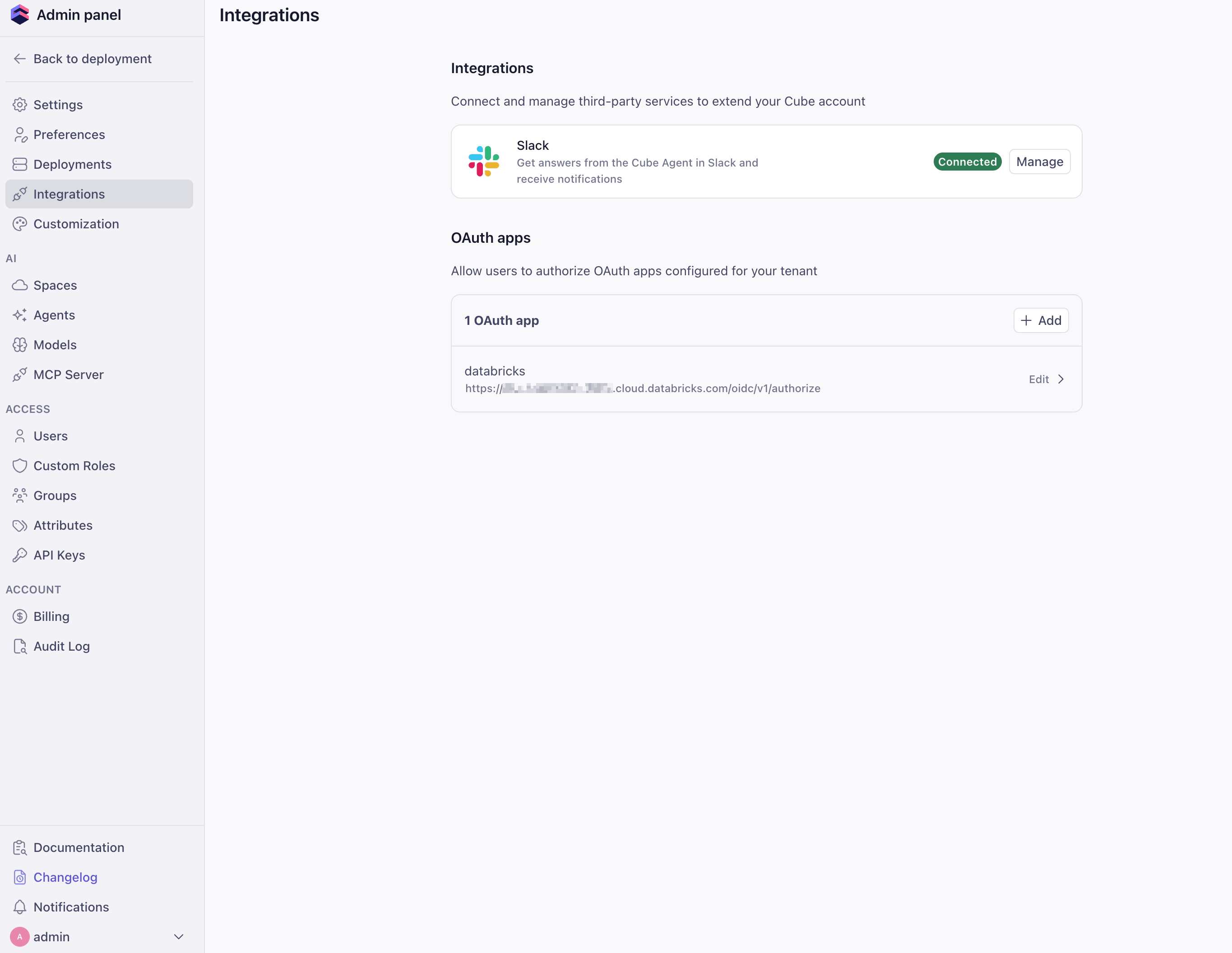
In Cube Cloud, go to **Admin → Integrations → OAuth apps** and click
**Add**.
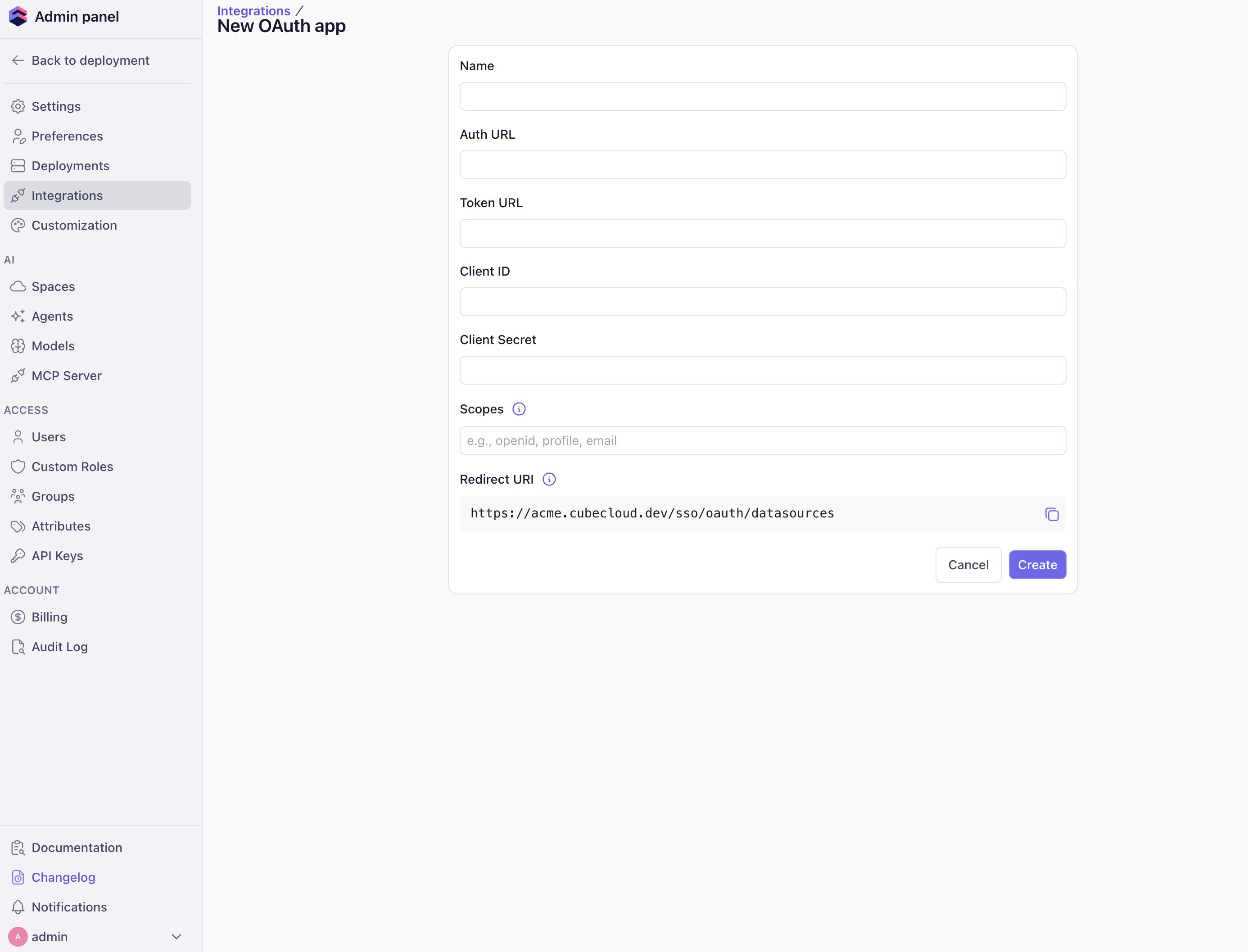
 Provide the OAuth app metadata from your data source: **Name**,
**Auth URL**, **Token URL**, **Client ID**, **Client Secret**, and any
required **Scopes**. Copy the **Redirect URI** shown in this form and
register it with your data source's OAuth provider, then click
**Create**.
Provide the OAuth app metadata from your data source: **Name**,
**Auth URL**, **Token URL**, **Client ID**, **Client Secret**, and any
required **Scopes**. Copy the **Redirect URI** shown in this form and
register it with your data source's OAuth provider, then click
**Create**.
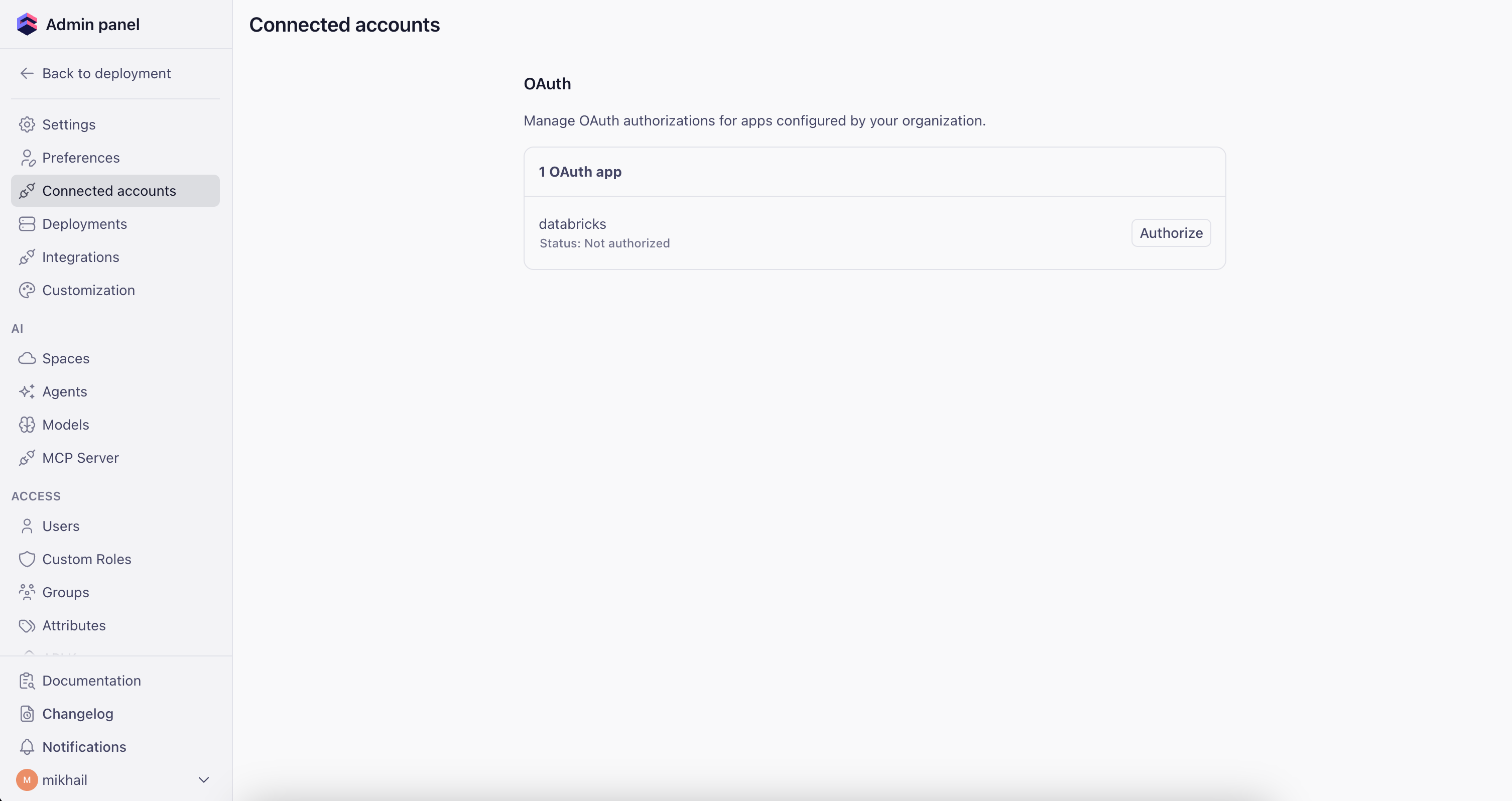
 Open the sidebar and go to **Connected apps**. Find your OAuth app
and click **Authorize** to generate an access token.
You'll need to repeat this step whenever the token expires.
Open the sidebar and go to **Connected apps**. Find your OAuth app
and click **Authorize** to generate an access token.
You'll need to repeat this step whenever the token expires.
 ## Configuration
The configuration uses two options from the
[configuration file reference][ref-config]:
* [`driver_factory`][ref-driver-factory] — dynamically selects the
authentication credential per request
* [`context_to_orchestrator_id`][ref-context-to-orchestrator-id] — gives
each user their own query orchestrator instance (database connections,
execution queues, pre-aggregation table caches)
### Environment variables
Set the environment variables for your data source. The examples below
show Databricks and Snowflake; adapt them to your specific setup.
```dotenv theme={"dark"}
CUBEJS_DB_TYPE=databricks-jdbc
CUBEJS_DB_DATABRICKS_URL=jdbc:databricks://dbc-XXXXXXX-XXXX.cloud.databricks.com:443/default;transportMode=http;ssl=1;httpPath=sql/protocolv1/o/XXXXX/XXXXX;AuthMech=3;UID=token
CUBEJS_DB_DATABRICKS_TOKEN=dapi_service_account_token
CUBEJS_DB_DATABRICKS_ACCEPT_POLICY=true
# Optional: specify a catalog
CUBEJS_DB_DATABRICKS_CATALOG=my_catalog
```
```dotenv theme={"dark"}
CUBEJS_DB_TYPE=snowflake
CUBEJS_DB_SNOWFLAKE_ACCOUNT=XXXXXXXXX.us-east-1
CUBEJS_DB_SNOWFLAKE_WAREHOUSE=MY_SNOWFLAKE_WAREHOUSE
CUBEJS_DB_NAME=my_snowflake_database
CUBEJS_DB_USER=service_account_user
CUBEJS_DB_PASS=service_account_password
CUBEJS_DB_SNOWFLAKE_ROLE=MY_ROLE
```
### Configuration file
The examples below use Databricks. To target a different data source,
swap `userCredentials.databricks` for the matching key (for example,
`userCredentials.snowflake`) and update the `driver_factory` return
value with the correct `type` and driver-specific options. See the
[data sources reference][ref-data-sources] for available drivers.
```python cube.py theme={"dark"}
from cube import config
from datetime import datetime, timezone
import os
import time
# A token is handed to the driver once, but the pool keeps opening new sessions
# with it afterwards. Reject one that is too close to expiry to survive that
# gap, rather than one that is merely still valid at this instant.
EXPIRY_SKEW_SECONDS = 120
def _parse_expiry(value):
"""Seconds since the epoch, or None if the value is absent or unparseable."""
if not value:
return None
if isinstance(value, (int, float)):
# Epoch milliseconds if the value is far too large to be seconds.
return value / 1000 if value > 1e11 else float(value)
try:
parsed = datetime.fromisoformat(str(value).replace("Z", "+00:00"))
except ValueError:
return None
if parsed.tzinfo is None:
parsed = parsed.replace(tzinfo=timezone.utc)
return parsed.timestamp()
def _access_token(ctx: dict):
"""The user's OAuth token, or None to fall back to the service account."""
# For other data sources, swap "databricks" for "snowflake", etc.
cube_cloud = (ctx.get("securityContext") or {}).get("cubeCloud") or {}
creds = (cube_cloud.get("userCredentials") or {}).get("databricks") or {}
access_token = creds.get("accessToken")
expires_at = _parse_expiry(creds.get("accessTokenExpiresAt"))
# Gate on the expiry rather than on `status`: a failed background refresh
# can flag the record while the token already in hand is still valid, and
# treating that as fatal drops the user onto the service account for no
# reason.
if access_token and expires_at and expires_at > time.time() + EXPIRY_SKEW_SECONDS:
return access_token
return None
@config("driver_factory")
def driver_factory(ctx: dict) -> dict:
# Cube rebuilds this connection whenever the returned configuration
# changes, so returning a rotated token here is enough to replace it.
return {
"type": "databricks-jdbc",
"url": os.environ["CUBEJS_DB_DATABRICKS_URL"],
"token": _access_token(ctx) or os.environ["CUBEJS_DB_DATABRICKS_TOKEN"],
"acceptPolicy": True,
"catalog": os.environ.get("CUBEJS_DB_DATABRICKS_CATALOG"),
}
@config("context_to_orchestrator_id")
def context_to_orchestrator_id(ctx: dict) -> str:
# One orchestrator per user: separate DB connections, execution queues and
# pre-aggregation caches. Deliberately not keyed on the token — see the
# warning above.
cube_cloud = (ctx.get("securityContext") or {}).get("cubeCloud") or {}
username = cube_cloud.get("username") or "default"
return f"CUBE_APP_{username}"
```
```javascript cube.js theme={"dark"}
// A token is handed to the driver once, but the pool keeps opening new sessions
// with it afterwards. Reject one that is too close to expiry to survive that
// gap, rather than one that is merely still valid at this instant.
const EXPIRY_SKEW_MS = 120 * 1000;
/** The user's OAuth token, or undefined to fall back to the service account. */
function accessToken(securityContext) {
// For other data sources, swap `databricks` for `snowflake`, etc.
const creds = securityContext?.cubeCloud?.userCredentials?.databricks ?? {};
const raw = creds.accessTokenExpiresAt;
// Epoch milliseconds if the value is far too large to be seconds. Reading
// seconds as milliseconds would land in 1970 and reject every token.
const expiresAt =
typeof raw === "number"
? (raw > 1e11 ? raw : raw * 1000)
: Date.parse(raw ?? "");
// Gate on the expiry rather than on `status`: a failed background refresh can
// flag the record while the token already in hand is still valid, and
// treating that as fatal drops the user onto the service account for no
// reason. NaN fails this comparison, so an unparseable expiry falls back too.
if (creds.accessToken && expiresAt > Date.now() + EXPIRY_SKEW_MS) {
return creds.accessToken;
}
return undefined;
}
module.exports = {
// Cube rebuilds this connection whenever the returned configuration changes,
// so returning a rotated token here is enough to replace it.
driverFactory: ({ securityContext }) => ({
type: "databricks-jdbc",
url: process.env.CUBEJS_DB_DATABRICKS_URL,
token:
accessToken(securityContext) ?? process.env.CUBEJS_DB_DATABRICKS_TOKEN,
acceptPolicy: true,
catalog: process.env.CUBEJS_DB_DATABRICKS_CATALOG,
}),
// One orchestrator per user: separate DB connections, execution queues and
// pre-aggregation caches. Deliberately not keyed on the token — see the
// warning above.
contextToOrchestratorId: ({ securityContext }) =>
`CUBE_APP_${securityContext?.cubeCloud?.username ?? "default"}`,
};
```
## How it works
1. **User makes a request** — Cube Cloud attaches the user's OAuth
credentials to `securityContext.cubeCloud.userCredentials.`
(for example, `.databricks` or `.snowflake`).
2. **`driver_factory` resolves the credential** — If the user has a token
that has not expired, it is used. Otherwise, Cube falls back to the
service account credential stored in environment variables.
3. **Per-user orchestrator** —
[`context_to_orchestrator_id`][ref-context-to-orchestrator-id] returns a
key derived from the username, so each user gets their own database
connection pool, execution queues, and pre-aggregation table cache.
Without it, every user shares one cached connection and the first
user's credential is reused for everyone else's queries.
4. **Rotation replaces the connection** — on the next request after a
rotation, Cube compares what `driver_factory` now resolves against what
the cached connection was built from. When they differ it builds a
replacement and drains the old pool, so in-flight queries finish on the
connection they started on.
## Operational notes
* **One orchestrator per user, not per token.** The orchestrator survives
rotations, so pre-aggregation caches and queues stay warm and the
orchestrator count tracks your concurrent user count rather than growing
with every rotation.
* **Don't make [`context_to_app_id`][ref-context-to-appid] per-user.** The
data model is identical for every user — only the connection differs —
so a per-user app ID forces a full data-model recompile per user on
every replica for no benefit. Leave it unset, or return a constant if
your deployment already sets one.
* **Give the service account the minimum it needs to pass a connection
check.** If it has no access at all, liveness checks and any query that
falls back to it fail with an opaque authorization error from the driver
rather than something diagnosable.
* **Falling back is silent.** A missing or near-expired token sends the
query to the service account instead of failing, so results reflect the
service account's permissions rather than the user's. If that is not
acceptable for your deployment, raise an error in `driver_factory`
instead of returning the fallback credential.
[ref-config]: /reference/configuration/config
[ref-driver-factory]: /reference/configuration/config#driver_factory
[ref-context-to-orchestrator-id]: /reference/configuration/config#context_to_orchestrator_id
[ref-context-to-appid]: /reference/configuration/config#context_to_app_id
[ref-databricks-jdbc]: /admin/connect-to-data/data-sources/databricks-jdbc
[ref-snowflake]: /admin/connect-to-data/data-sources/snowflake
[ref-data-sources]: /admin/connect-to-data/data-sources
[ref-cube-cloud]: /docs/introduction
## Configuration
The configuration uses two options from the
[configuration file reference][ref-config]:
* [`driver_factory`][ref-driver-factory] — dynamically selects the
authentication credential per request
* [`context_to_orchestrator_id`][ref-context-to-orchestrator-id] — gives
each user their own query orchestrator instance (database connections,
execution queues, pre-aggregation table caches)
### Environment variables
Set the environment variables for your data source. The examples below
show Databricks and Snowflake; adapt them to your specific setup.
```dotenv theme={"dark"}
CUBEJS_DB_TYPE=databricks-jdbc
CUBEJS_DB_DATABRICKS_URL=jdbc:databricks://dbc-XXXXXXX-XXXX.cloud.databricks.com:443/default;transportMode=http;ssl=1;httpPath=sql/protocolv1/o/XXXXX/XXXXX;AuthMech=3;UID=token
CUBEJS_DB_DATABRICKS_TOKEN=dapi_service_account_token
CUBEJS_DB_DATABRICKS_ACCEPT_POLICY=true
# Optional: specify a catalog
CUBEJS_DB_DATABRICKS_CATALOG=my_catalog
```
```dotenv theme={"dark"}
CUBEJS_DB_TYPE=snowflake
CUBEJS_DB_SNOWFLAKE_ACCOUNT=XXXXXXXXX.us-east-1
CUBEJS_DB_SNOWFLAKE_WAREHOUSE=MY_SNOWFLAKE_WAREHOUSE
CUBEJS_DB_NAME=my_snowflake_database
CUBEJS_DB_USER=service_account_user
CUBEJS_DB_PASS=service_account_password
CUBEJS_DB_SNOWFLAKE_ROLE=MY_ROLE
```
### Configuration file
The examples below use Databricks. To target a different data source,
swap `userCredentials.databricks` for the matching key (for example,
`userCredentials.snowflake`) and update the `driver_factory` return
value with the correct `type` and driver-specific options. See the
[data sources reference][ref-data-sources] for available drivers.
```python cube.py theme={"dark"}
from cube import config
from datetime import datetime, timezone
import os
import time
# A token is handed to the driver once, but the pool keeps opening new sessions
# with it afterwards. Reject one that is too close to expiry to survive that
# gap, rather than one that is merely still valid at this instant.
EXPIRY_SKEW_SECONDS = 120
def _parse_expiry(value):
"""Seconds since the epoch, or None if the value is absent or unparseable."""
if not value:
return None
if isinstance(value, (int, float)):
# Epoch milliseconds if the value is far too large to be seconds.
return value / 1000 if value > 1e11 else float(value)
try:
parsed = datetime.fromisoformat(str(value).replace("Z", "+00:00"))
except ValueError:
return None
if parsed.tzinfo is None:
parsed = parsed.replace(tzinfo=timezone.utc)
return parsed.timestamp()
def _access_token(ctx: dict):
"""The user's OAuth token, or None to fall back to the service account."""
# For other data sources, swap "databricks" for "snowflake", etc.
cube_cloud = (ctx.get("securityContext") or {}).get("cubeCloud") or {}
creds = (cube_cloud.get("userCredentials") or {}).get("databricks") or {}
access_token = creds.get("accessToken")
expires_at = _parse_expiry(creds.get("accessTokenExpiresAt"))
# Gate on the expiry rather than on `status`: a failed background refresh
# can flag the record while the token already in hand is still valid, and
# treating that as fatal drops the user onto the service account for no
# reason.
if access_token and expires_at and expires_at > time.time() + EXPIRY_SKEW_SECONDS:
return access_token
return None
@config("driver_factory")
def driver_factory(ctx: dict) -> dict:
# Cube rebuilds this connection whenever the returned configuration
# changes, so returning a rotated token here is enough to replace it.
return {
"type": "databricks-jdbc",
"url": os.environ["CUBEJS_DB_DATABRICKS_URL"],
"token": _access_token(ctx) or os.environ["CUBEJS_DB_DATABRICKS_TOKEN"],
"acceptPolicy": True,
"catalog": os.environ.get("CUBEJS_DB_DATABRICKS_CATALOG"),
}
@config("context_to_orchestrator_id")
def context_to_orchestrator_id(ctx: dict) -> str:
# One orchestrator per user: separate DB connections, execution queues and
# pre-aggregation caches. Deliberately not keyed on the token — see the
# warning above.
cube_cloud = (ctx.get("securityContext") or {}).get("cubeCloud") or {}
username = cube_cloud.get("username") or "default"
return f"CUBE_APP_{username}"
```
```javascript cube.js theme={"dark"}
// A token is handed to the driver once, but the pool keeps opening new sessions
// with it afterwards. Reject one that is too close to expiry to survive that
// gap, rather than one that is merely still valid at this instant.
const EXPIRY_SKEW_MS = 120 * 1000;
/** The user's OAuth token, or undefined to fall back to the service account. */
function accessToken(securityContext) {
// For other data sources, swap `databricks` for `snowflake`, etc.
const creds = securityContext?.cubeCloud?.userCredentials?.databricks ?? {};
const raw = creds.accessTokenExpiresAt;
// Epoch milliseconds if the value is far too large to be seconds. Reading
// seconds as milliseconds would land in 1970 and reject every token.
const expiresAt =
typeof raw === "number"
? (raw > 1e11 ? raw : raw * 1000)
: Date.parse(raw ?? "");
// Gate on the expiry rather than on `status`: a failed background refresh can
// flag the record while the token already in hand is still valid, and
// treating that as fatal drops the user onto the service account for no
// reason. NaN fails this comparison, so an unparseable expiry falls back too.
if (creds.accessToken && expiresAt > Date.now() + EXPIRY_SKEW_MS) {
return creds.accessToken;
}
return undefined;
}
module.exports = {
// Cube rebuilds this connection whenever the returned configuration changes,
// so returning a rotated token here is enough to replace it.
driverFactory: ({ securityContext }) => ({
type: "databricks-jdbc",
url: process.env.CUBEJS_DB_DATABRICKS_URL,
token:
accessToken(securityContext) ?? process.env.CUBEJS_DB_DATABRICKS_TOKEN,
acceptPolicy: true,
catalog: process.env.CUBEJS_DB_DATABRICKS_CATALOG,
}),
// One orchestrator per user: separate DB connections, execution queues and
// pre-aggregation caches. Deliberately not keyed on the token — see the
// warning above.
contextToOrchestratorId: ({ securityContext }) =>
`CUBE_APP_${securityContext?.cubeCloud?.username ?? "default"}`,
};
```
## How it works
1. **User makes a request** — Cube Cloud attaches the user's OAuth
credentials to `securityContext.cubeCloud.userCredentials.`
(for example, `.databricks` or `.snowflake`).
2. **`driver_factory` resolves the credential** — If the user has a token
that has not expired, it is used. Otherwise, Cube falls back to the
service account credential stored in environment variables.
3. **Per-user orchestrator** —
[`context_to_orchestrator_id`][ref-context-to-orchestrator-id] returns a
key derived from the username, so each user gets their own database
connection pool, execution queues, and pre-aggregation table cache.
Without it, every user shares one cached connection and the first
user's credential is reused for everyone else's queries.
4. **Rotation replaces the connection** — on the next request after a
rotation, Cube compares what `driver_factory` now resolves against what
the cached connection was built from. When they differ it builds a
replacement and drains the old pool, so in-flight queries finish on the
connection they started on.
## Operational notes
* **One orchestrator per user, not per token.** The orchestrator survives
rotations, so pre-aggregation caches and queues stay warm and the
orchestrator count tracks your concurrent user count rather than growing
with every rotation.
* **Don't make [`context_to_app_id`][ref-context-to-appid] per-user.** The
data model is identical for every user — only the connection differs —
so a per-user app ID forces a full data-model recompile per user on
every replica for no benefit. Leave it unset, or return a constant if
your deployment already sets one.
* **Give the service account the minimum it needs to pass a connection
check.** If it has no access at all, liveness checks and any query that
falls back to it fail with an opaque authorization error from the driver
rather than something diagnosable.
* **Falling back is silent.** A missing or near-expired token sends the
query to the service account instead of failing, so results reflect the
service account's permissions rather than the user's. If that is not
acceptable for your deployment, raise an error in `driver_factory`
instead of returning the fallback credential.
[ref-config]: /reference/configuration/config
[ref-driver-factory]: /reference/configuration/config#driver_factory
[ref-context-to-orchestrator-id]: /reference/configuration/config#context_to_orchestrator_id
[ref-context-to-appid]: /reference/configuration/config#context_to_app_id
[ref-databricks-jdbc]: /admin/connect-to-data/data-sources/databricks-jdbc
[ref-snowflake]: /admin/connect-to-data/data-sources/snowflake
[ref-data-sources]: /admin/connect-to-data/data-sources
[ref-cube-cloud]: /docs/introduction